How Shoe Retailers Use POS Data to Grow: A Complete Guide for Rics and Lightspeed Users
If you're an independent shoe retailer running RICS or Lightspeed, your point-of-sale system already contains nearly everything you need to grow your business — customer records, transaction history, brand trends, dormant customer segments, and more. This guide walks you through what's actually in your POS, the four highest-value questions it can answer, and what the most successful independent retailers are doing with theirs today.
If you own an independent retail shoe store, you're sitting on a goldmine of data you probably aren't using. Here's what's actually in your point-of-sale system, what you can do with it, and how to start — without hiring a data team.
The moment every shoe retailer eventually has
Somewhere between year three and year fifteen of running your store, it hits you.
You're standing behind the counter on a slow Tuesday, looking at the register, and you realize: I have no idea who my best customers actually are. You know their faces. You know a few of their names. You know Mary comes in every six weeks for running shoes and that the guy with the dog always buys the same brand of walking socks. But when you try to think about your customer base as a whole — who's repeat, who's one-time, who's drifted away, who's bought the most from you this year — you realize you're flying on gut feel.
And it's not just customers. It's brands, too. You think Hoka is up over last year. You think that one boot line is quietly dying. You think Thursdays are your best weekday. But you don't actually know. Because every time you try to pull a real report out of your point-of-sale system, you either give up five minutes in or you end up with a CSV export that looks like someone sneezed a phone book onto your screen.
Here's the thing. All of that information — every question you've ever wanted to ask about your business — is already in your POS. Every transaction you've ever run. Every customer who's ever handed you a credit card. Every brand you've ever sold, every size, every return, every loyalty point. It's all there. Has been the whole time.
The problem isn't that you don't have data. The problem is that no one ever showed you what to do with it.
This article is going to show you what to do with it. By the time you're done reading, you'll understand exactly what's sitting in your POS, what you can do with it, what the most successful independent shoe retailers are actually doing with theirs, and what it looks like to go from "I have a bunch of customer records" to "I have a data team working for me." No jargon, no enterprise software speak, and no pretending this is simpler than it is.
Let's start with what's actually in your POS right now.
What's actually in your POS right now
Most independent shoe retailers dramatically underestimate what their point-of-sale system knows about their business. That's not your fault — POS systems weren't built to show you what they know. They were built to ring up sales. But the information is in there, and once you see it listed out, you'll realize you've been sitting on a gold mine.
Here's what a typical POS — RICS, Lightspeed, or most modern systems — has captured about your business, probably going back years:
Every transaction you've ever run. Date, time, store location if you have multiple, items sold, price, discount, payment method, associate who rang it up. Years of it. A store that's been running for five years has somewhere between 100,000 and a million of these records depending on size. All timestamped. All sortable.
Customer-level purchase history. Every customer who's ever given you an email, phone number, or signed up for a loyalty program is linked to everything they've ever bought from you. Not just the last purchase — the full history. Which means you can look at a single customer and see every pair of shoes, every brand, every size, every dollar they've spent in your store since day one.
Product and brand performance. Every SKU you've carried, ranked by units sold, revenue, margin, and return rate. Cross-tabbed by month, quarter, year, season. You can see which brands are quietly dying and which are breaking out, months before it shows up in your gut feel.
Category-level trends. Your POS knows that running shoes are up 12% year over year while casual walking shoes are down 8%, even if you haven't noticed. It knows what's growing in your basket composition and what's shrinking.
Day-of-week and time-of-day patterns. Which days are your strongest, which hours are dead, how Saturday traffic compares to Wednesday traffic, how store #3 performs against store #7 on the same day.
Repeat customer behavior. How many customers bought once. How many bought twice. How many keep coming back. How long between their first purchase and their second. Which brands trigger repeat visits. Which don't.
Basket composition. What else people buy when they buy running shoes. Which accessories attach to which footwear. Average items per transaction, average basket value, single-item purchase rate.
That's just the top layer. For a typical independent shoe retailer, there are somewhere between 50 and 200 usable data points per customer, multiplied by thousands (or tens of thousands) of customers, multiplied by years of history. It's a lot. Which is exactly why most retailers never look at it — because opening that much data without a guide is overwhelming.
The good news is that you don't need to understand all 200 data points. You only need to answer a handful of specific questions, and the rest of the data exists to support those answers. Which brings us to the next section.
The three things you can actually do with POS data
Everything a shoe retailer wants to do with their POS data falls into one of three buckets. Just three. Once you see the framework, the whole thing gets dramatically less scary.
1. Analyze. Understand what's happening in your business. What's selling, to whom, when, where, and how that's changed over time. This is the "finally being able to see your business clearly" bucket. Every shoe retailer needs this before they can do anything else.
2. Personalize. Reach your customers individually based on what they've actually bought. This is where most shoe retailers are shocked to learn what's possible. The customer who bought a pair of Hokas two years ago and hasn't been back? You can reach that specific person on Facebook, Instagram, and email — not as an anonymous "former customer," but as the exact human being who walked into your store in 2023.
3. Measure. Know whether your marketing is actually driving sales at the register, not just clicks on an ad. Most retailers can't answer this question about their Facebook ads or their email campaigns. They spend money and hope. Measurement is the difference between "hope" and "know."
That's the whole framework. Analyze, personalize, measure. Every useful thing you can do with POS data fits into one of those three buckets, and most of the time you're going to be doing all three in sequence — analyze a pattern, personalize a response to it, measure whether it worked.
Simple, right? So why doesn't every independent retailer do this already?
Why most shoe retailers don't do any of this (and it's not their fault)
This is the part where I want to be honest, because if I pretended the answer was "most retailers just don't know better," I'd be disrespecting your intelligence.
The real reasons most independent shoe retailers don't use their POS data have nothing to do with laziness or ignorance. They're structural.
POS systems weren't built to show you what they know. RICS, Lightspeed, and every other major POS were designed to process transactions efficiently, not to help you understand your business. The reporting features that exist are usually clunky, slow, limited in date range, and exported as CSVs that require a spreadsheet and an hour to turn into something usable. The data is in there, but the interface to it is hostile.
Enterprise data tools were priced for the chains. The companies that built real analytics software for retail — Tableau, Domo, Looker, the big names — priced their products for retailers with 50+ locations and a dedicated data analyst on staff. A small retailer looking at those tools sees a $40,000-a-year contract, a three-month implementation, and a training requirement, and walks away. That's not on you. The software industry just didn't build for small business.
You're wearing ten hats already. Running an independent store means you're the buyer, the marketer, the HR department, the inventory manager, the customer service lead, and the window washer, often all in the same day. "Sit down and analyze your POS data for four hours" isn't a realistic ask. You don't have four hours. Nobody does.
The learning curve is real. Even if you had the time and the tools, there's a genuine expertise gap. Knowing which questions to ask, how to interpret the answers, and what to do about them is a whole skillset — the kind of skillset you pay a data analyst $85,000 a year for. Most small retailers have never even met a data analyst, let alone been able to afford one.
The brands selling you "data solutions" have burned you before. If you've been in retail more than a few years, you've probably been pitched some kind of loyalty platform, customer intelligence tool, or marketing automation system that promised the world and delivered a monthly bill and nothing else. Justifiable skepticism is a rational response.
All five of these are real problems. None of them are your fault. And collectively, they've kept small retailers from touching their own data for the last twenty years.
Here's the good news: every one of those problems has gotten dramatically better in the last five years. Let me explain why.
What's changed in the last five years (and why now is the moment)
Four things quietly shifted between roughly 2019 and today, and together they changed the economics of data analytics for small retailers from "impossible" to "obviously worth doing." Most shoe retailers haven't caught up yet.
Ad platforms got cheap, and they got accurate. A Facebook ad reaching a thousand of your actual customers now costs less than a cup of coffee. And the targeting has gotten scary good. You can upload a customer list to Meta and, on average, match 60 to 80 percent of those customers to their real Facebook and Instagram profiles. That's not marketing hype — that's the actual match rate we see across dozens of shoe retailers we've worked with. If you have 10,000 customers in your POS, somewhere between 6,000 and 8,000 of them are directly reachable on Meta right now, for pennies per impression.
Email and SMS platforms got powerful. Klaviyo in particular has become the category-defining platform for segment-based email and SMS marketing — meaning you can send a completely different email to your one-time Hoka buyers than you send to your VIP Brooks loyalists. That level of segmentation used to require enterprise software. Now it's available to any retailer willing to spend a couple hundred dollars a month.
POS-to-marketing integrations got real. Until recently, connecting your POS data to Meta and Klaviyo required either a developer, a custom-built pipeline, or a manual export every week. That's no longer true. The plumbing that used to be a multi-thousand-dollar custom build is now, frankly, mostly a solved problem.
Software pricing moved from enterprise to subscription. The "data analyst in a box" tools that used to cost tens of thousands of dollars a year are now available as monthly subscriptions in the $100 to $300 range. Not because the software got less valuable — because the business model shifted. Subscription software means a retailer with 14 stores and a retailer with 1 store can both use the same platform, priced proportionally.
Put those four shifts together, and here's what you end up with: an independent retailer can now do, for a few hundred dollars a month, what used to require a $500,000 software stack and a full-time analyst. That's the math. That's why I keep telling retailers this is the best time in history to own an independent store — because the only advantage the big chains had over you was data, and data just became free.
Except almost nobody is using it.
The four questions your POS can answer right now
This is the section that's going to be the most useful part of this article for most readers, so I want you to slow down here.
The fastest way to get value out of your POS data is to stop trying to "analyze" it in the abstract and start asking specific questions. Here are the four questions I've seen the most successful independent retailers ask, in order of how much revenue impact they tend to drive. Each one is answerable today, in your existing POS, if you know where to look.
Question 1: "Which of my customers haven't been back in over a year, and how can I reach them?"
This is the single highest-ROI question you can ask, and almost no independent shoe retailer asks it. Here's why it matters: every retailer has a surprisingly large pool of dormant customers — people who bought from you once, maybe twice, loved the experience, and then drifted away because life happened. They're not angry with you. They're not loyal to a competitor. They just forgot. And they're sitting in your POS with names, emails, phone numbers, and purchase histories.
The workflow to bring them back looks like this:
1. Segment your customers by last-visit date in your POS. Pull everyone who hasn't been in for 12+ months.
2. Upload that list to Meta as a custom audience. You'll likely match 60 to 80 percent of them to their actual Facebook and Instagram profiles.
3. Upload the same list to Klaviyo as a segment. Build a "we miss you" email and SMS flow.
4. Run a small retargeting campaign on Meta — a budget of $200 to $500 is plenty to start — combined with the Klaviyo flow.
5. Track who actually walks back into the store by matching new transactions against the list.
A significant percentage of those customers will come back. Not all. Some are truly gone. But for most retailers, a dormant customer reactivation campaign is the single most profitable marketing play they can run, because the cost per reactivated customer is a fraction of what it costs to acquire a brand new one.
Question 2: "Which brands are actually growing in my store — not just selling well?"
This one sounds simple and isn't. "Selling well" is a snapshot. "Growing" is a trend. The difference matters enormously when you're making buying decisions for next season.
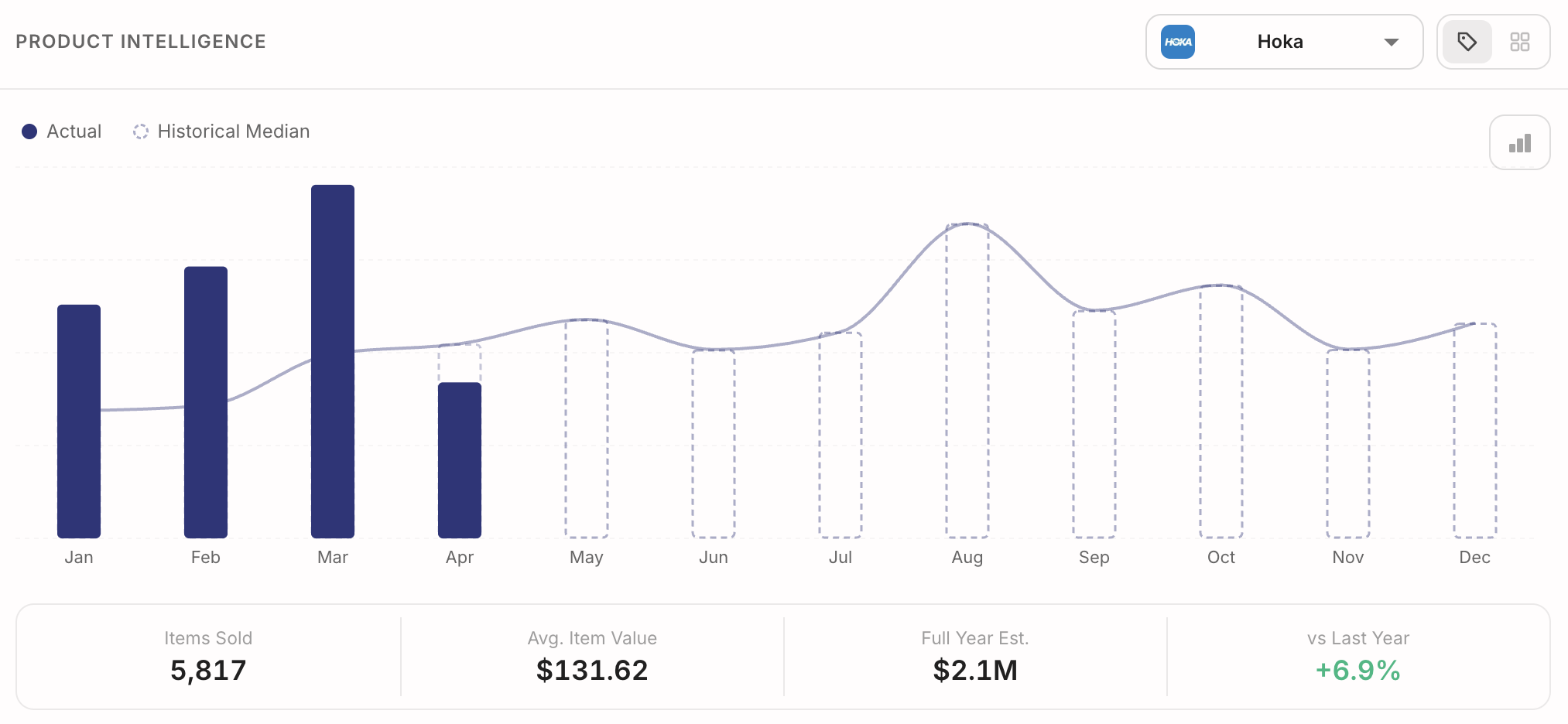
Here's the specific version of the question: Is Hoka up 8% over where it normally sits at this time of year, or is it just having a good month? To answer that honestly, you need to compare this year's sales against the same time period in prior years — not just last year, but ideally the five-year median of that brand's performance in your store during the same weeks.
Your POS has the data to do this. The data has been there for years. What's usually missing is the tool that does the comparison automatically. But once you can see it, you know which brands to double down on for the next buy, which ones to cut, and which ones to quietly phase out. Retailers who get good at this question tend to outperform their peers on margin because they're not over-ordering declining brands or under-ordering the ones about to break out.
Question 3: "Who are my top 10% of customers, and what should I be doing with them?"
Most shoe retailers know this rule intuitively: a small percentage of your customers drive a disproportionate amount of your revenue. In most independent shoe stores, the top 10% of customers by spend are responsible for somewhere between 30% and 50% of total revenue. That's not a marketing cliche — that's an observable pattern we see repeated in nearly every POS we touch.
Here's the embarrassing part: most shoe retailers have no idea who their top 10% are. They couldn't name them. They couldn't reach them individually if they tried. These are the customers who should be getting early access to new arrivals, personalized notes, loyalty perks, and invitations to exclusive events. Instead, they usually get the exact same email blast as everyone else — if they get anything at all.
The fix: segment your customer base by lifetime spend in your POS. Pull the top 10%. Build a separate Klaviyo flow just for them. Maybe build a separate Meta audience just for them. Start treating your VIPs like VIPs. The ROI on this is absurd because these customers already love you. You just have to stop ignoring them.
Question 4: "Did that last campaign actually drive sales — or did I just get clicks?"
This is the question that separates retailers who are using data from retailers who are guessing. Meta will happily tell you your ad got 40,000 impressions and 1,200 clicks. Klaviyo will happily tell you your email had a 28% open rate and a 4% click-through rate. Great. Now tell me: how much money did it actually make you at the register?
Most retailers can't answer that question, because the platforms that run the campaigns and the systems that track in-store sales don't talk to each other. Which means for years, retailers have been spending real money on marketing without knowing whether any of it worked.
The fix is to match campaign spend against actual POS transactions — not Meta's estimated conversions, which are wildly inflated. This is called POS-matched attribution, and it's what every serious retailer should be measuring. Once you can see it, marketing stops being a leap of faith. You know exactly which campaigns drove which customers into which stores and how much they spent. You double down on the winners and quietly kill the losers.
Those are the four questions. If you can answer just those four — dormant customers, growing brands, top 10%, and true ROI — you are doing more sophisticated data work than 95% of independent retailers in America. And every one of those questions is answerable today, in a POS you already own.
The only thing standing between you and those answers is a tool that makes them visible.
What this actually looks like in practice
Let me make this concrete with a real example from a retailer we've worked with for the last six years.
This particular retailer is a multi-location specialty shoe store — 14 locations, an established business, the kind of independent retailer that's been around long enough to build real relationships with their customers. Six years ago, when they first looked at their POS data with us, here's what they found:
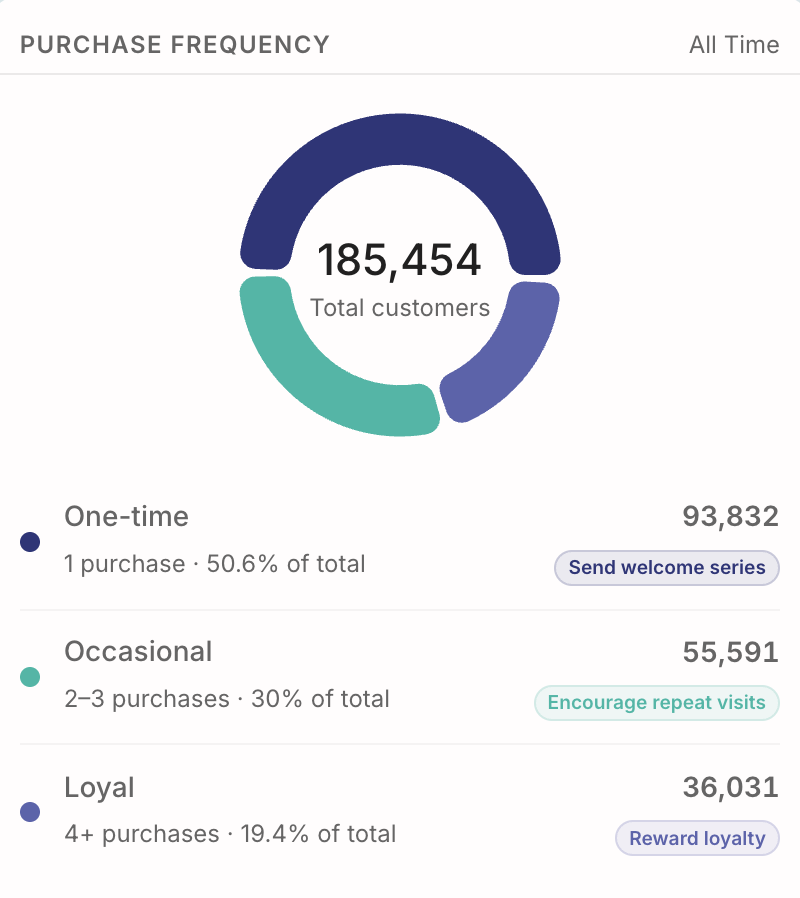
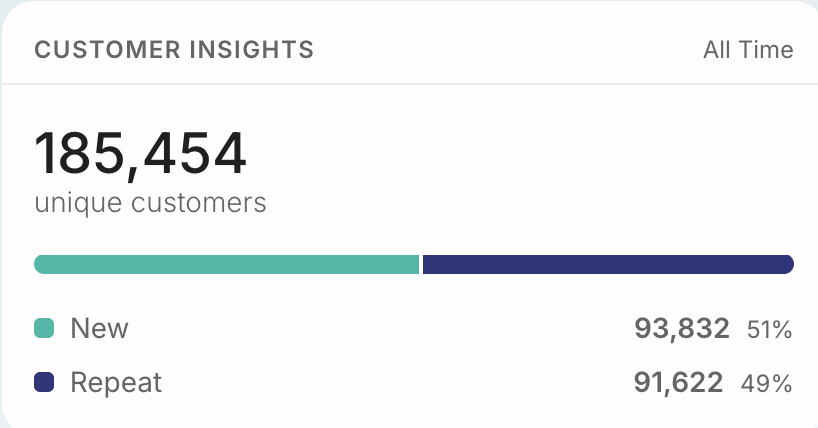
185,454 total customers in their point-of-sale system. They knew the number was large, but they'd never actually looked at it as a single figure before. Seeing the total written down in one place was itself a moment of clarity. That's almost two hundred thousand people who've given us money at some point.
124,627 of those customers matched to a real Meta profile — a 67% match rate, right in the middle of the typical 60 to 80 percent range we see across retailers. In plain English: nearly 125,000 of their actual customers were now sitting in their Facebook and Instagram ad accounts as a ready-made audience, waiting to be targeted with the same precision that Nike and Hoka use to target them.
93,832 of their customers — 50.6% — were one-time buyers. People who'd walked in, bought one thing, and never come back. When you say it as a percentage it sounds like a number. When you say it as 93,832 individual humans, it hits different. Every one of those people had a reason they never came back. Maybe they forgot. Maybe they moved. Maybe the shoes didn't quite fit. But they weren't angry — they were just gone.
43,100 of those customers had been completely dormant for 12 months or more. Meaning not only did they buy once, but they hadn't been in the store in over a year. Before Omni, those 43,100 customers were effectively invisible. There was no system that flagged them, no report that surfaced them, no way to reach them at scale. They were, functionally, lost revenue.
Here's what changed. Once the retailer had Visibility connected to their POS and the Meta and Klaviyo modules active, they could segment those 43,100 dormant customers with two clicks. That segment automatically synced as a custom audience to Meta and as an email list to Klaviyo. They built a "we miss you" email and SMS flow in Klaviyo, launched a companion retargeting campaign on Meta aimed at the exact same list, and put both of them in front of the 43,100 people who hadn't walked into their stores in over a year.
That dormant customer campaign has become one of the most reliable revenue drivers in their entire marketing mix — not a one-time stunt, but a standing channel. They've run it consistently, across every location, in every season. It's the reason they've stayed on the platform for six years and counting. And it's the kind of campaign that was, for most of retail history, literally impossible for an independent retailer to run because the pieces didn't fit together.
Now, here's the important part for you as the reader: that retailer is not special. The only thing different about them is that six years ago, they decided to actually look at their data. Every one of those numbers — the 67% match rate, the 50% one-time customer population, the dormant pool — is typical for an established independent shoe retailer. If you've been in business five-plus years with a customer database in your POS, yours are going to look similar. Possibly identical.
Which means this specific workflow — surface dormant customers, segment them, retarget them on Meta, re-engage them in Klaviyo, measure the result — is available to you today, in your POS, with the customers you already have.
You just need a tool to do it with.
How to actually get started (with or without us)
I'm going to give you three honest options here, because the goal of this article isn't to trick you into buying something — it's to help you use your data. Any of these three paths is better than doing nothing.
Option 1: DIY with spreadsheets and manual exports. This is free, and it's what most retailers who "want to get serious about data" end up trying first. You export customer lists from your POS on a weekly or monthly schedule, wrangle them in Excel or Google Sheets, build pivot tables, upload CSVs to Meta and Klaviyo by hand, and track results manually. It works, technically. The problem is that it's a full-time job in disguise. Most retailers who try this last about six weeks before the spreadsheets get out of date and the workflow quietly dies. But if you have a family member, an employee, or yourself with real spreadsheet skills and about ten hours a week to dedicate to it — it can work.
Option 2: Hire a fractional data analyst or a retail data agency. This is more expensive but removes the time burden. A freelance data analyst who specializes in retail will typically cost somewhere between $1,500 and $5,000 a month for part-time work, depending on scope and location. A full agency engagement — someone who handles the analysis, the campaign execution, and the reporting — usually lands in the $3,000 to $10,000 per month range. This is what a lot of mid-sized retailers end up doing, and honestly, it often works well. The downside is that you're paying for someone's time, not for a tool, which means costs scale with how much work you need done rather than with your business size.
Option 3: Use a platform built specifically for independent retailers. This is the option that didn't really exist five years ago and is now, in my opinion, the best answer for most retailers with 5,000 or more customers in their POS. Purpose-built platforms are dramatically cheaper than hiring a person, dramatically faster than DIY spreadsheets, and — if they're well-designed — require almost zero learning curve. The catch is that you have to pick one built for the kind of retailer you are, not a generic enterprise tool dressed down for small business.
What to look for in a platform, regardless of whether it's Omni or someone else:
• It integrates directly with your POS — not via manual exports, but with a live, automated connection. If you're on RICS or Lightspeed, good platforms will connect in minutes. If you're on something else, ask pointedly how they handle it.
• It covers all three buckets — analyze, personalize, and measure. If it only does one, you'll end up needing multiple tools. If it does all three in one place, that's better.
• It shows you real in-store attribution, not just clicks. If a platform can only tell you about impressions and clicks, it's not actually measuring whether your marketing drove sales. Keep looking.
• Pricing is transparent and proportional to your store count. You should not have to "get on a call" to find out what something costs. Run away from any vendor who hides their pricing.
• There's a real onboarding process. Not a video tutorial. A human being who sits with you for your first session and makes sure you can actually use the thing. The best platforms treat onboarding as part of the product.
• It works with the marketing tools you already use — Meta and Klaviyo at minimum, and ideally more to come.
Any platform that checks those boxes is probably a reasonable choice. The specific platform we built is Omni Lightning, which I'll tell you about in the next section — but I want you to evaluate it against those criteria, not take my word for it.
A quick look at what we built (and what it costs)
Everything in this article — the analyze/personalize/measure framework, the four questions, the workflow we walked through with the 14-location retailer — is what we built Omni Lightning to do.
Omni Lightning is a data platform specifically for independent retailers running RICS or Lightspeed. It has three modules that work together:
Visibility is the analysis layer. Connect your POS in about a minute and it starts pulling every transaction, customer record, and brand-level sales history. Once it's loaded, you can answer every one of the four questions we walked through — dormant customers, brand trends against a five-year median, top-10% segmentation, and store-by-store comparisons if you have multiple locations. You also get a daily digest that lands in your inbox every morning with plain-English summaries of what happened yesterday. No spreadsheets. No manual exports.
Meta is the Facebook and Instagram module. It takes the customer segments you build in Visibility and automatically syncs them to Meta as custom audiences, so you can run targeted ads to your actual customers — dormant, VIP, brand-specific, whatever you want. It also shows you real POS-matched attribution, so you can see which campaigns drove actual in-store sales rather than just clicks.
Klaviyo is the email and SMS module. Same idea — segments from Visibility sync automatically to Klaviyo, so you can run personalized flows to specific customer groups without manually managing lists. And same attribution model: you see which campaigns drove real revenue at the register.
All three modules are built on the same underlying customer database, which means a segment you build once — say, your top 10% of customers — is available simultaneously in Meta, Klaviyo, and Visibility without any duplication or manual syncing.
Who it's for: Independent retailers with 5,000 or more customers in their POS, running RICS or Lightspeed, who are ready to actually use their data to run personalized marketing campaigns. Multi-location retailers get additional value because the store-by-store comparison features really start to shine once you have two or more locations.
Who it isn't for: Retailers with fewer than 5,000 customers in their POS — the math just doesn't work yet at that scale, and you'd be better served by sticking with Option 1 (DIY) until you grow. Retailers on a POS we don't integrate with today (more on that in a moment). And retailers who don't have anyone on staff willing to spend 15 minutes a week looking at their data. If nobody's going to look at it, no platform is going to help.
What it costs. Here's the full pricing, per store, billed monthly — because I think hiding pricing is disrespectful:
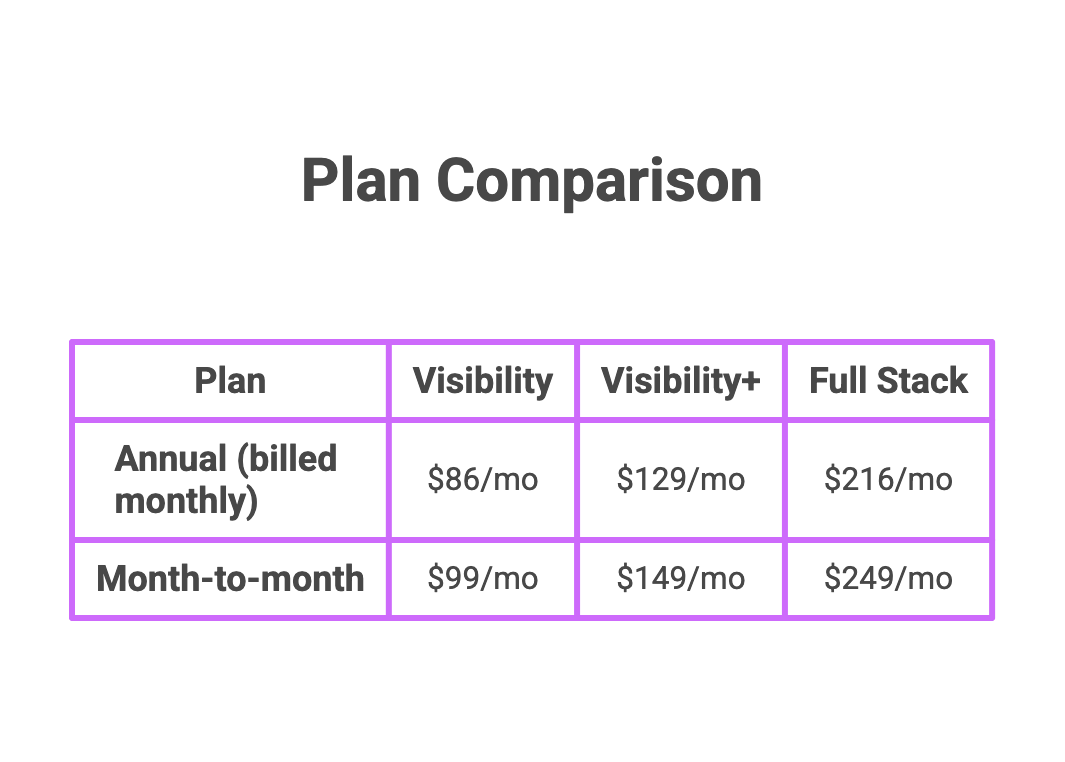
Visibility alone gives you the POS analytics, daily digests, and customer insights. Visibility+ adds early access to new features plus inventory intelligence, an iOS app, and an AI business agent (all launching in the next 60 days). Full Stack includes all three modules — Visibility, Meta, and Klaviyo — and is what most retailers end up choosing because the three modules are significantly more powerful together than apart. If you want just one integration (Meta or Klaviyo only) instead of both, that plan runs $199/mo annual or the equivalent monthly.
Pricing is per store. So a 14-location retailer on Full Stack is looking at roughly $3,200/mo. A single-store independent on Visibility alone is $86/mo. Every plan includes a dedicated onboarding session, because a platform you can't use isn't actually worth anything.
If you're not on RICS or Lightspeed: Here's the straight answer. Omni Lightning won't work for you today. We're being upfront about that because we'd rather you know now than find out on a sales call. We're actively building integrations with Heartland, NCR, Shopify POS, and several others — but they're not live yet. If you're on one of those systems, the best thing you can do is reach out and tell us. Every retailer who raises their hand helps us prioritize what to build next, and you'll be first in line when your system goes live.
What to do next
If you got this far, you're the person this article was written for. Here are three things you can do from here, in increasing order of commitment. Any of them is a good move.
1. Tomorrow morning, look at your POS differently. Before you do anything else, open up the customer section of your POS and just look at the total customer count. Then try to figure out how many of them have bought more than once. Then try to figure out how many haven't been in for over a year. You probably won't be able to answer those questions cleanly — that's the point. Seeing where your POS fails you is the first step toward understanding what a platform like Omni actually solves.
2. If you're on RICS or Lightspeed and you want to see what this looks like with your own data, book a walkthrough. No sales pitch, no pressure, no commitment. We'll spend 30 minutes showing you what your store looks like inside Visibility, using your actual numbers. Most retailers come out of that session saying some version of the same sentence — I had no idea any of this was even possible. If that sounds like you, the link is at the bottom of this article.
3. If you're not on RICS or Lightspeed, or you're not ready for a platform yet, that's fine too. Go back to the four questions in the middle of this article and try to answer them manually. Even getting partial answers will change how you think about your business. And if you want to be first in line when we integrate with your POS, reach out and let us know what system you're on. We're keeping a list.
The thing I want you to take away from this article, more than any specific tactic or feature, is this: every piece of information you need to grow your business in 2026 is already in your point-of-sale system. Every customer, every transaction, every trend, every warning sign, every opportunity. It's been there the whole time.
The only thing standing between you and those answers is the tool that makes them visible, and the decision to actually use it. The tool finally exists. The decision is yours.
This is the best time in the history of retail to own an independent store, and almost nobody's talking about it. I hope this article changed that a little bit for you.
Frequently Asked Questions
How can independent shoe retailers use their POS data to grow?
Independent shoe retailers can use their point-of-sale data to grow in three main ways. First, by analyzing what's actually happening in their business — which brands are trending, which customers come back, which days drive the most revenue. Second, by personalizing marketing to their actual customers using segments pulled from their POS, matched to Meta and Klaviyo audiences. Third, by measuring whether campaigns actually drove sales at the register using POS-matched attribution rather than platform-reported metrics. Together, these three capabilities let independent retailers compete on data the same way major chains have for years, for a fraction of the cost.
What kind of customer data is stored in a Rics or Lightspeed POS system?
Rics and Lightspeed POS systems store significantly more data than most retailers realize. This includes every transaction with date, time, location, and items sold; customer-level purchase history linking every customer record to everything they've ever bought; product and brand performance ranked by units and revenue; category-level trends over time; day-of-week and time-of-day patterns; repeat customer behavior and purchase frequency; and basket composition including items per transaction and average basket value. For a typical independent shoe retailer, there are between 50 and 200 usable data points per customer, multiplied by thousands of customers and years of history.
How do you run a dormant customer campaign using POS data?
A dormant customer campaign using POS data follows a clear five-step workflow. First, segment your customers by last-visit date in your POS and pull everyone who hasn't been in for 12 months or more. Second, upload that list to Meta as a custom audience — you'll typically match 60 to 80 percent of those customers to their real Facebook and Instagram profiles. Third, upload the same list to Klaviyo and build a "we miss you" email and SMS flow. Fourth, run a small retargeting campaign on Meta (a $200 to $500 budget is enough to start) in combination with the Klaviyo flow. Fifth, track who walks back into the store by matching new transactions against the original list. Dormant customer reactivation is typically the highest-ROI marketing campaign a retailer can run because reactivation costs are a fraction of new customer acquisition.
What is POS-matched attribution and why does it matter?
POS-matched attribution is the process of measuring marketing campaign results against actual in-store transactions rather than against platform-reported conversions from Meta or Klaviyo. It matters because platform-reported conversions are notoriously inflated — Meta and other ad platforms count impressions, clicks, and estimated conversions, but they can't see what actually happens at your register. POS-matched attribution connects your advertising spend directly to real sales, so you know exactly which campaigns drove which customers into which stores and how much they spent. This is the difference between guessing whether marketing worked and actually knowing.
How much does a POS data analytics platform typically cost for an independent retailer?
POS data analytics platforms for independent retailers typically cost between $86 and $249 per store per month, depending on the feature set and billing cycle. Basic POS analytics-only plans start around $86 per month on an annual commitment. Full-stack plans that include POS analytics plus Meta and Klaviyo integrations typically run $229 to $249 per store per month. For comparison, hiring a fractional retail data analyst ranges from $1,500 to $5,000 per month, and a full agency engagement typically costs $3,000 to $10,000 per month. Purpose-built platforms are dramatically cheaper than hiring a person and are generally the best fit for independent retailers with 5,000 or more customers in their POS.
Ready to see what your store looks like inside Omni Visibility? Book a no-pressure walkthrough at omnilightning.com, or reach out directly if your POS isn't on RICS or Lightspeed yet — we want to hear from you.